
 Loading...
If you have hundreds of friends added to your yahoo or other messenger, you sometimes feel irritated at the bombarding messages every second from them. And then you think of appearing invisible to everyone and then talk secretly with some of your very near ones. Do you wish to know who is fooling you around by appearing offline?
You can learn who is appearing offline in Yahoo Messenger very easily. A very useful site Xeeber.
Such a service is not available for Windows Live Messenger. Microsoft’s Server security doesn’t let others learn about it. However, you can have a useful information about your Live Messenger contacts. Borrado.net is a site that lets you see which of your contacts in Live Messenger have blocked or deleted you. Just login with your Live Messenger ID and you’ll be shown which of your contacts have deleted or blocked you. Don’t be naive, you may sometimes be sending a series of IMs to a friend who might have already deleted you.
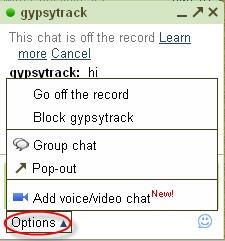 You can also see which of your friends are appearing invisible to you in Gmail. The option for appearing invisible is only available in Gmail, not in Gtalk or the desktop widget. To know if anyone is appearing invisible in Gmail, you must be logged in to it. Then click on “Go off the record” option from the Options pop-up in the chat box. Activating this option will stop saving the conversations with the person. Now if your friend is appearing invisible, the message you send will be received on the other side and you’ll receive no error messages. But if he/she is really offline, you will get a message saying that your chat wasn’t delivered.
So, if your friends are having a nice peaceful time appearing offline, disturb them with some annoying messages. Won’t it be fun to see invisible contacts in Gmail or Yahoo? And don’t be so gullible to be easily deceived; check which of your contacts have deleted or blocked you in Live Messenger.